
标签
访客信息
IP 地址: 正在加载...
地理位置: 正在加载...
与博主距离: 正在计算...
运 营 商: 正在加载...
操作系统: 正在加载...
浏 览 器: 正在加载...
CDN 节点: ![Detecting...]()
二次更新文章
近 7 天无更新
1977 字
10 分钟
ClaudeCode下载代理(Worker)
通过 Cloudflare Worker 搭建 Claude Code 安装代理,解决国内无法直接下载的问题
1. Claude Code 是什么?
简单来讲,Claude Code 就是一款 AI 智能编程工具,具有强大的 Vibe Coding 能力,详细介绍请看 Claude Code 使用笔记。
2. 入门安装
由于不可抗因素,Claude 的母公司 Anthropic 对中国大陆拒绝提供 AI 服务,禁止使用 Claude 系列模型。但我们仅仅只是想使用 Claude Code 这个工具(Claude Code ≠ AI 模型),所以不要再发出类似于”Cursor 不如 Claude”这种驴唇不对马嘴的言论了。
官方的 NPM 安装方式已处于废弃状态,更推荐使用原生安装。
但正如前文所说,如果直接使用官方命令(国内正常网络环境下):
irm https://claude.ai/install.ps1 | iex大概率会得到以下报错:
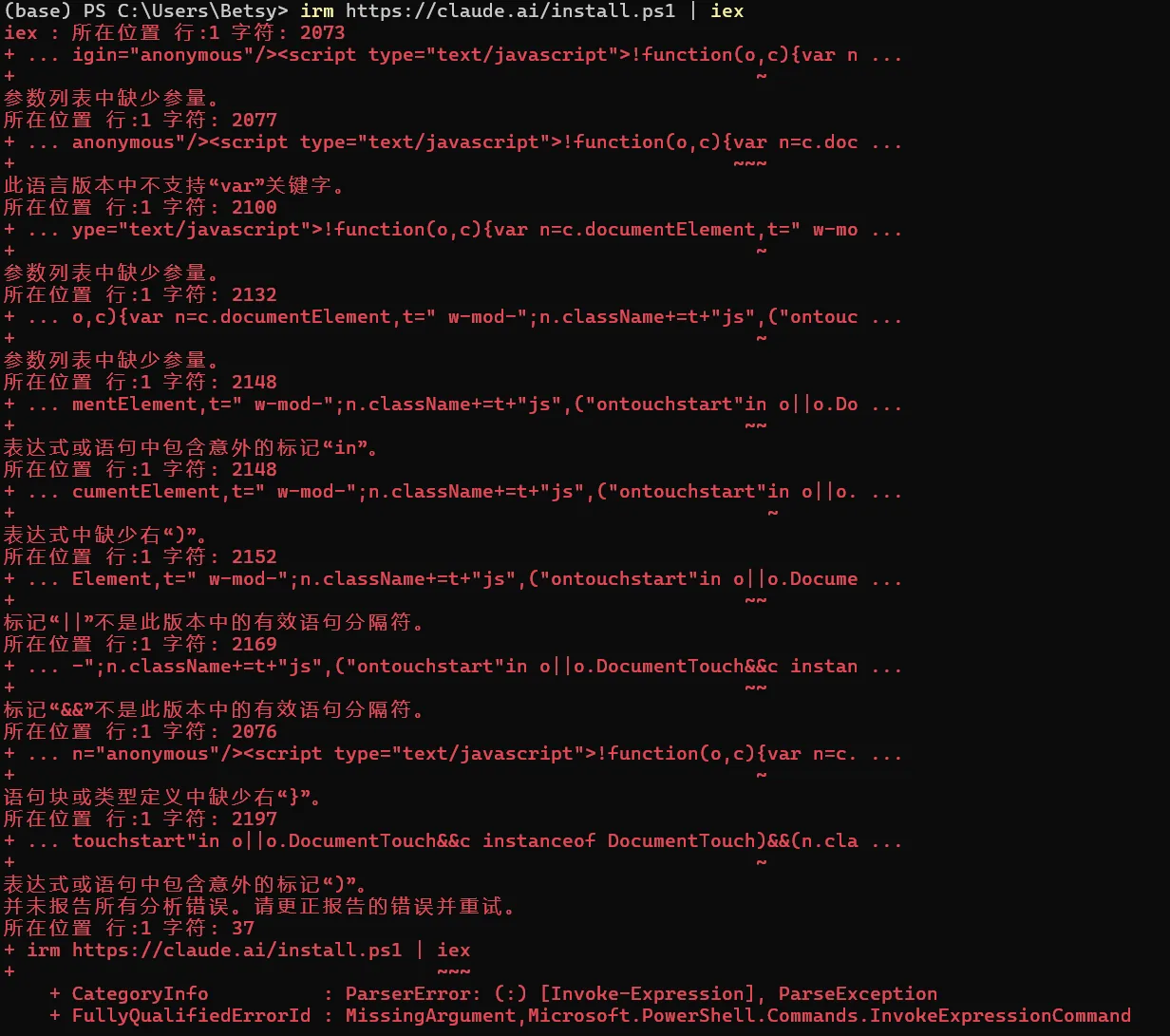 因此,我们提供了基于 Cloudflare Worker 的加速下载方案。
3. Worker 配置
3.1 核心 Worker 代码
请将 SELF_BASE 修改为你要使用的加速域名:
const CLAUDE = "https://claude.ai";const SELF_BASE = "https://你的加速域名";const ALLOWED_INSTALL = new Set(["/install.ps1", "/install.sh", "/install.cmd"]);// 安装脚本体积上限 1MB(正常脚本 <50KB,此值仅防异常/被劫持场景)const MAX_INSTALL_SCRIPT_SIZE = 1 * 1024 * 1024;
function isAllowedGcsPath(p) { // 只允许 claude-code-dist-* bucket 下的路径 const pathOnly = p.split('?')[0]; return /^claude-code-dist-[0-9a-f\-]+\//.test(pathOnly);}
function withTimeout(ms) { const controller = new AbortController(); const id = setTimeout( () => controller.abort(new Error("Upstream fetch timeout")), ms ); return { controller, cancel: () => clearTimeout(id) };}
/** 安全文本响应头 */function secHeaders(extra = {}) { return { "Content-Type": "text/plain; charset=utf-8", "Cache-Control": "no-store", "X-Content-Type-Options": "nosniff", "X-Frame-Options": "DENY", ...extra, };}
async function buildUpstreamErrorResponse({ title, upstreamResp, extraHeaders = {},}) { // 消费 body 防止连接泄漏 try { await upstreamResp.text(); } catch {}
const body = [ title, `Time: ${new Date().toISOString()}`, `Upstream status: ${upstreamResp.status}`, ].join("\n");
return new Response(body, { status: 502, headers: secHeaders({ "X-Proxy-Error": "upstream_non_ok", ...extraHeaders, }), });}
export default { async fetch(request) { const url = new URL(request.url); let path = url.pathname;
// ===== 处理 OPTIONS 预检请求 ===== if (request.method === "OPTIONS") { return new Response(null, { status: 204, headers: { "Access-Control-Allow-Origin": "*", "Access-Control-Allow-Methods": "GET, HEAD, OPTIONS", "Access-Control-Allow-Headers": "Content-Type, User-Agent, Accept, Accept-Encoding", "Access-Control-Max-Age": "86400", }, }); }
// ===== 只允许 GET / HEAD ===== if (!["GET", "HEAD"].includes(request.method)) { return new Response("Method Not Allowed", { status: 405, headers: secHeaders(), }); }
if (path === "/favicon.ico") { return new Response(null, { status: 204 }); }
// 健康检查页面 if (path === "/") { const clientIp = request.headers.get("CF-Connecting-IP") || "unknown"; const clientCountry = request.headers.get("CF-IPCountry") || "unknown";
const checks = await Promise.allSettled([ (async () => { const { controller, cancel } = withTimeout(15000); try { const resp = await fetch(CLAUDE + "/install.ps1", { signal: controller.signal, headers: { "User-Agent": "Mozilla/5.0" }, }); cancel(); if (!resp.ok) return { ok: false, msg: `HTTP ${resp.status}` }; const text = await resp.text(); const hasGcs = text.includes("storage.googleapis.com/"); const rewritten = text.replace( /\$GCS_BUCKET = "https:\/\/storage\.googleapis\.com\/([^"]+)"/g, `$GCS_BUCKET = "${SELF_BASE}/gcs/$1"` ); const ok = rewritten.includes(SELF_BASE + "/gcs/"); return { ok, msg: ok ? "拉取成功,改写正常" : (hasGcs ? "正则未匹配" : "源脚本无 GCS 链接") }; } catch (e) { cancel(); return { ok: false, msg: String(e) }; } })(), (async () => { const { controller, cancel } = withTimeout(20000); try { const resp = await fetch( `https://storage.googleapis.com/claude-code-dist-86c565f3-f756-42ad-8dfa-d59b1c096819/claude-code-releases/latest`, { signal: controller.signal, headers: { "User-Agent": "CloudflareWorker/1.0" } } ); cancel(); if (!resp.ok) return { ok: false, msg: `HTTP ${resp.status}` }; const version = (await resp.text()).trim(); return { ok: true, msg: `版本: ${version}` }; } catch (e) { cancel(); return { ok: false, msg: String(e) }; } })(), ]);
const ps1Status = checks[0].status === "fulfilled" ? checks[0].value : { ok: false, msg: "检查失败" }; const gcsStatus = checks[1].status === "fulfilled" ? checks[1].value : { ok: false, msg: "检查失败" };
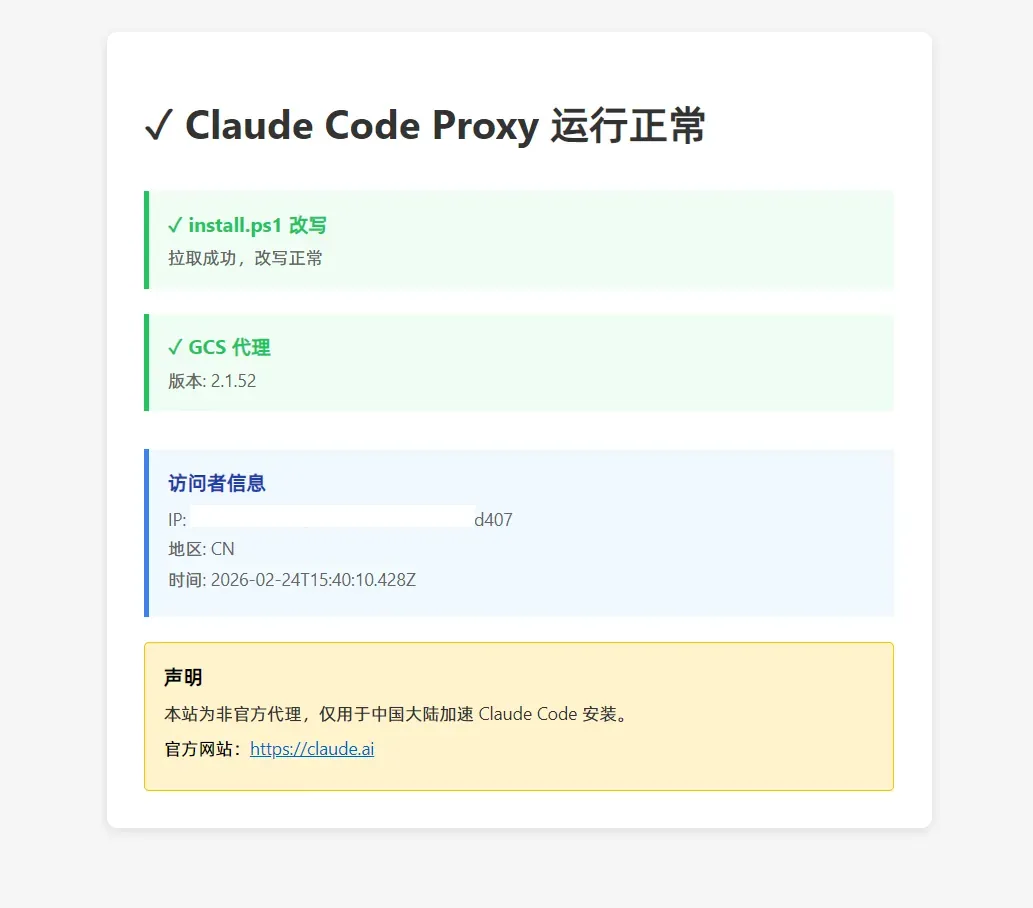
const html = `<!DOCTYPE html><html><head> <meta charset="utf-8"> <meta name="viewport" content="width=device-width, initial-scale=1"> <title>Claude Code Proxy - 健康检查</title> <style> body { font-family: -apple-system, BlinkMacSystemFont, "Segoe UI", sans-serif; margin: 40px; background: #f5f5f5; } .container { max-width: 600px; margin: 0 auto; background: white; padding: 30px; border-radius: 8px; box-shadow: 0 2px 8px rgba(0,0,0,0.1); } h1 { color: #333; margin-bottom: 30px; } .check { margin: 20px 0; padding: 15px; border-left: 4px solid #ddd; background: #fafafa; } .check.ok { border-left-color: #22c55e; background: #f0fdf4; } .check.fail { border-left-color: #ef4444; background: #fef2f2; } .status { font-weight: bold; margin-bottom: 5px; } .status.ok { color: #22c55e; } .status.fail { color: #ef4444; } .msg { color: #666; font-size: 14px; } .info { margin-top: 30px; padding: 15px; background: #f0f9ff; border-left: 4px solid #3b82f6; } .info-title { font-weight: bold; color: #1e40af; margin-bottom: 8px; } .info-item { color: #666; font-size: 14px; margin: 5px 0; } </style></head><body> <div class="container"> <h1>✓ Claude Code Proxy 运行正常</h1>
<div class="check ${ps1Status.ok ? "ok" : "fail"}"> <div class="status ${ps1Status.ok ? "ok" : "fail"}"> ${ps1Status.ok ? "✓" : "✗"} install.ps1 改写 </div> <div class="msg">${ps1Status.msg}</div> </div>
<div class="check ${gcsStatus.ok ? "ok" : "fail"}"> <div class="status ${gcsStatus.ok ? "ok" : "fail"}"> ${gcsStatus.ok ? "✓" : "✗"} GCS 代理 </div> <div class="msg">${gcsStatus.msg}</div> </div>
<div class="info"> <div class="info-title">访问者信息</div> <div class="info-item">IP: ${clientIp}</div> <div class="info-item">地区: ${clientCountry}</div> <div class="info-item">时间: ${new Date().toISOString()}</div> </div>
<div style="margin-top:20px;padding:15px;background:#fff3cd;border:1px solid #ffc107;border-radius:4px;"> <strong>声明</strong> <p style="margin:8px 0;font-size:14px;color:#333;">本站为非官方代理,仅用于中国大陆加速 Claude Code 安装。</p> <p style="margin:8px 0;font-size:14px;">官方网站:<a href="https://claude.ai" target="_blank" rel="noopener" style="color:#0066cc;">https://claude.ai</a></p> </div> </div></body></html>`;
return new Response(html, { status: 200, headers: { "Content-Type": "text/html; charset=utf-8" }, }); }
// 安装脚本:从 claude.ai 拉取,改写 GCS 链接指向自身 if (ALLOWED_INSTALL.has(path)) { const upstreamUrl = CLAUDE + path; const { controller, cancel } = withTimeout(15000);
let upstream; try { const fetchOpts = { method: request.method, headers: { "User-Agent": request.headers.get("User-Agent") || "Mozilla/5.0", Accept: "*/*", }, redirect: "follow", signal: controller.signal, }; upstream = await fetch(upstreamUrl, fetchOpts); } catch (e) { cancel(); return new Response( `Upstream fetch failed (install script)\nTime: ${new Date().toISOString()}\nError: ${String(e)}\n`, { status: 504, headers: secHeaders({ "X-Proxy-Error": "install_fetch_failed" }), } ); } finally { cancel(); }
// HEAD 直接透传状态 + 头(不读 body) if (request.method === "HEAD") { const h = new Headers(upstream.headers); h.set("Cache-Control", "no-store, max-age=0, must-revalidate"); h.set("Pragma", "no-cache"); h.set("Expires", "0"); h.set("X-Content-Type-Options", "nosniff"); h.set("X-Proxy-Source", `rewrite:${path}`); return new Response(null, { status: upstream.status, headers: h }); }
if (!upstream.ok) { return buildUpstreamErrorResponse({ title: "Failed to fetch install script from claude.ai", upstreamResp: upstream, extraHeaders: { "X-Proxy-Source": `rewrite:${path}` }, }); }
// ---- 大小保护:先查 Content-Length 头 ---- const cl = Number(upstream.headers.get("content-length") || "0"); if (cl > MAX_INSTALL_SCRIPT_SIZE) { await upstream.body?.cancel(); return new Response( `Install script too large (content-length: ${cl})\n`, { status: 502, headers: secHeaders({ "X-Proxy-Source": `rewrite:${path}` }), } ); }
const text = await upstream.text();
// ---- 大小保护:再查实际 body 长度(Content-Length 可能缺失或不准) ---- if (text.length > MAX_INSTALL_SCRIPT_SIZE) { return new Response("Install script body too large\n", { status: 502, headers: secHeaders({ "X-Proxy-Source": `rewrite:${path}` }), }); }
// 改写 GCS 链接 → 走自身代理 // PowerShell: $GCS_BUCKET = "https://storage.googleapis.com/..." let rewritten = text.replace( /\$GCS_BUCKET = "https:\/\/storage\.googleapis\.com\/([^"]+)"/g, `$GCS_BUCKET = "${SELF_BASE}/gcs/$1"` ); // Shell: GCS_BUCKET="https://storage.googleapis.com/..." rewritten = rewritten.replace( /GCS_BUCKET="https:\/\/storage\.googleapis\.com\/([^"]+)"/g, `GCS_BUCKET="${SELF_BASE}/gcs/$1"` ); // CMD: set "GCS_BUCKET=https://storage.googleapis.com/..." rewritten = rewritten.replace( /set "GCS_BUCKET=https:\/\/storage\.googleapis\.com\/([^"]+)"/g, `set "GCS_BUCKET=${SELF_BASE}/gcs/$1"` );
return new Response(rewritten, { status: 200, headers: { "Content-Type": "text/plain; charset=utf-8", "Cache-Control": "no-store, max-age=0, must-revalidate", Pragma: "no-cache", Expires: "0", "X-Content-Type-Options": "nosniff", "X-Proxy-Source": `rewrite:${path}`, }, }); }
// /gcs/*:代理到 storage.googleapis.com(白名单路径) if (path.startsWith("/gcs/")) { const gcsPath = path.slice("/gcs/".length);
if (!isAllowedGcsPath(gcsPath)) { return new Response("Forbidden", { status: 403, headers: secHeaders() }); }
// 转发查询字符串 const target = `https://storage.googleapis.com/${gcsPath}${url.search}`;
// 白名单转发请求头,不泄漏 Cookie / Authorization / 用户 IP 等 const fwdHeaders = new Headers(); const FORWARD = [ "Range", "Accept", "Accept-Encoding", "If-None-Match", "If-Modified-Since", ]; for (const h of FORWARD) { const v = request.headers.get(h); if (v) fwdHeaders.set(h, v); } fwdHeaders.set("User-Agent", "CloudflareWorker/1.0");
// exe/二进制文件按版本路径缓存,latest 和 manifest 不缓存 const isCacheable = !gcsPath.endsWith("/latest") && !gcsPath.endsWith("/manifest.json"); const isExe = gcsPath.endsWith("/claude.exe"); const timeoutMs = isExe ? 600000 : 20000; const { controller, cancel } = withTimeout(timeoutMs);
let upstream; try { const fetchOpts = { method: request.method, headers: fwdHeaders, redirect: "follow", signal: controller.signal, cf: isCacheable ? { cacheEverything: true, cacheTtl: 86400 } : { cacheEverything: false, cacheTtl: 0 }, }; upstream = await fetch(target, fetchOpts); } catch (e) { cancel(); return new Response( `Upstream fetch failed (gcs proxy)\nTime: ${new Date().toISOString()}\nError: ${String(e)}\n`, { status: 504, headers: secHeaders({ "X-Proxy-Error": "gcs_fetch_failed", "X-Proxy-Source": `gcs:${gcsPath}`, }), } ); } finally { cancel(); }
// 304 Not Modified:透传(CF 缓存层内部条件请求可能产生) if (upstream.status === 304) { const respHeaders = new Headers(upstream.headers); respHeaders.set("X-Proxy-Source", `gcs:${gcsPath}`); respHeaders.set("X-Content-Type-Options", "nosniff"); return new Response(null, { status: 304, headers: respHeaders }); }
// 非 2xx:返回友好错误,状态 502(避免客户端工具误当正常内容) if (!(upstream.status >= 200 && upstream.status < 300)) { return buildUpstreamErrorResponse({ title: "GCS upstream returned non-2xx", upstreamResp: upstream, extraHeaders: { "X-Proxy-Source": `gcs:${gcsPath}` }, }); }
// 成功:流式透传 body const respHeaders = new Headers(upstream.headers); respHeaders.set("Cache-Control", isCacheable ? "public, max-age=86400" : "no-store, max-age=0"); respHeaders.set("X-Proxy-Source", `gcs:${gcsPath}`); respHeaders.set("X-Content-Type-Options", "nosniff"); // 确保保留 Content-Length 和 Content-Type if (!respHeaders.has("Content-Type")) { respHeaders.set("Content-Type", "application/octet-stream"); }
return new Response(upstream.body, { status: upstream.status, headers: respHeaders, }); }
return new Response("Not Found", { status: 404, headers: secHeaders() }); },};3.2 Worker 路由
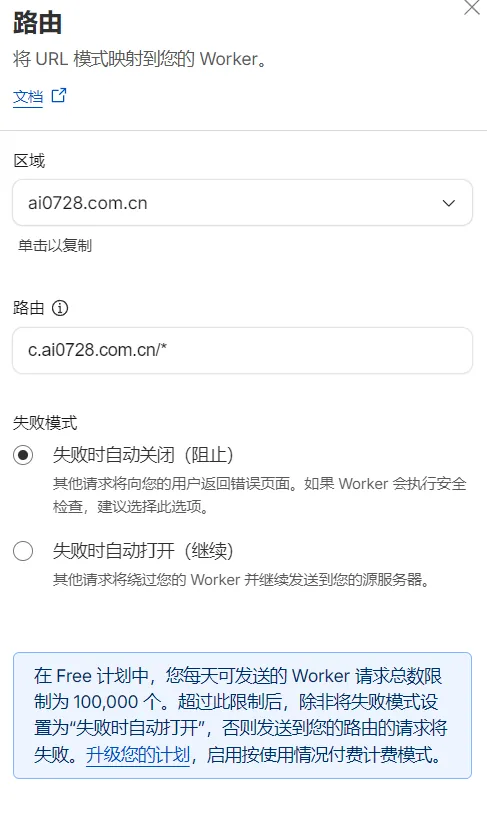
我们利用 Worker 的路由来进行转发(workers.dev 域名在大陆无法正常访问),请务必填写为 你的加速域名/*:
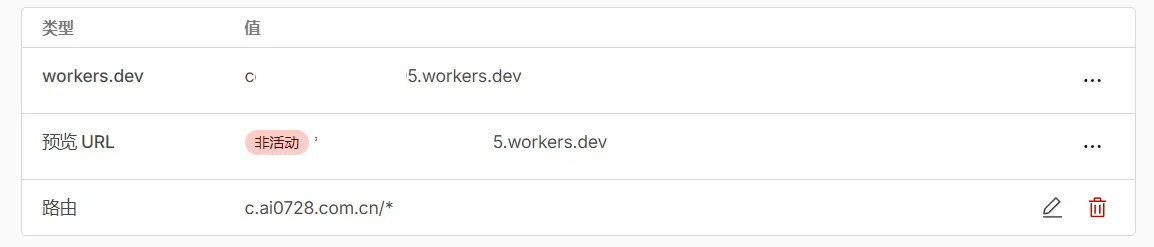
然后记录下你的 Worker 分配的子域名,例如 abc.abc.workers.dev:
4. 加速域名配置
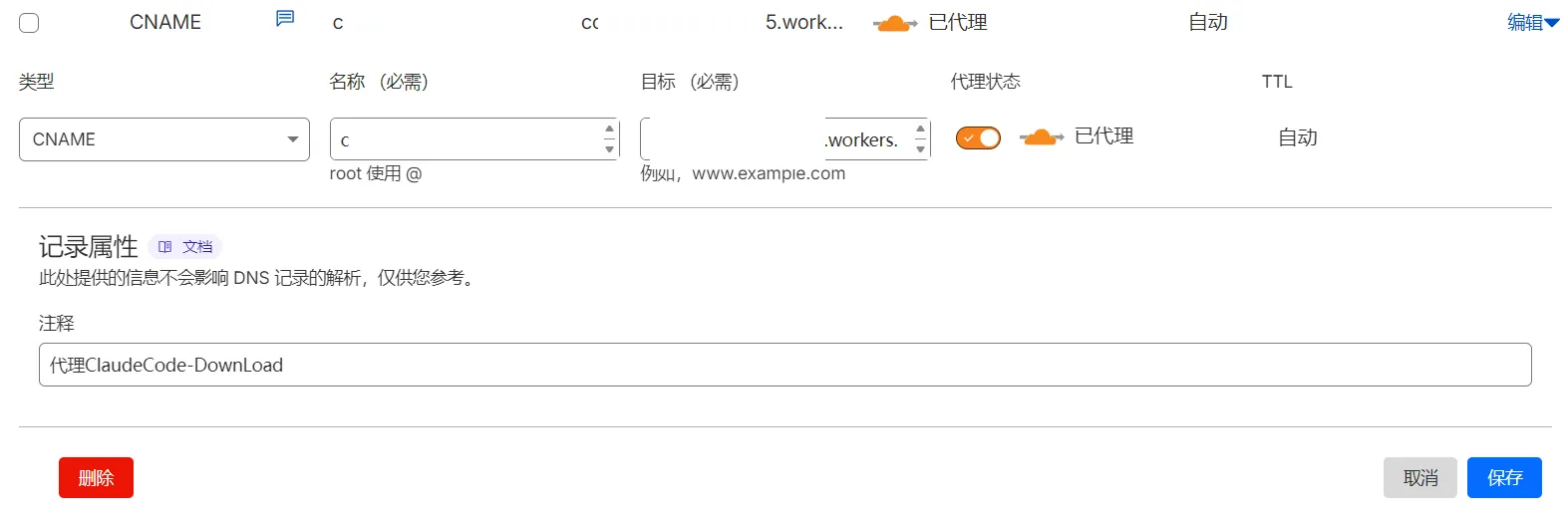
来到你托管在 Cloudflare 的域名下,选择 DNS — 记录,将你预定的加速域名 CNAME 指向你的 Worker 分配的子域名,如图所示(记得开启小黄云):
5. 使用
部署完成后,访问你的加速域名:
能否成功下载也取决于你的网络能否正常连接到 Cloudflare,请耐心等待,Worker 速度可能不太稳定。
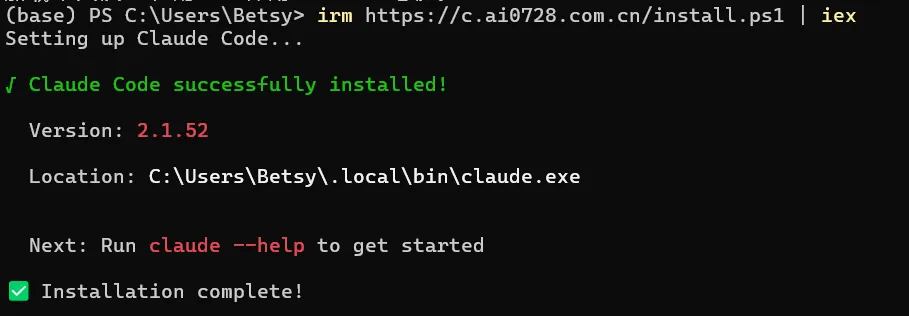
然后选择适合你终端的下载方式(以 PowerShell 为例):
irm https://c.ai0728.com.cn/install.ps1 | iex成功效果:
ClaudeCode下载代理(Worker)
https://www.micostar.cc/posts/claudecode_install_proxy/ 写作概览
21 篇
文章
1.6万
总字数
1.3h
阅读时长
765
均字数
年度发文
2026 4
2025 17
热门文章
最长文章
写作概览
21 篇
文章
1.6万
总字数
1.3h
阅读时长
765
均字数
年度发文
2026 4
2025 17
热门文章
最长文章
© 2024 - 2026 流转星(Betsy),采用
CC BY-NC-SA 4.0 许可。
RSS / 网站地图 / 关于 & 隐私政策
由 Astro 和 Fuwari 强力驱动
本网站代码 已开源
 鲁ICP备2025208441号-1
 鲁公网安备37091102000907号
RSS / 网站地图 / 关于 & 隐私政策
由 Astro 和 Fuwari 强力驱动
本网站代码 已开源
鲁ICP备2025208441号-1 鲁公网安备37091102000907号